PhotoSheet Pro
Fotodruckbogen-Maker
Bögen, die in der gewählten Größe drucken.
Papier, Fotogröße und Layout wählen. Fotos anordnen und ein druckfertiges PDF exportieren.
Was ist ein Fotodruckbogen-Maker?
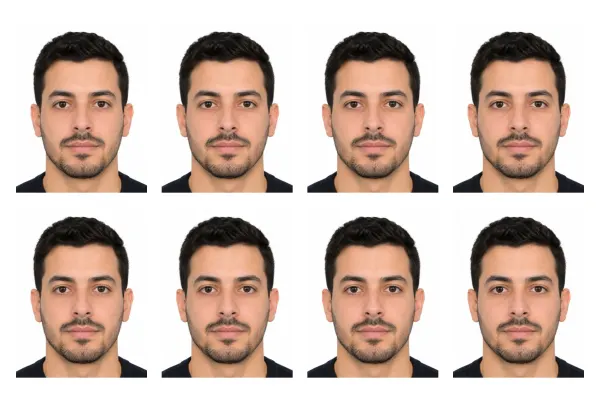
Ein Fotodruckbogen-Maker ordnet ein oder mehrere Fotos auf druckbarem Papier in exakten physischen Größen an — oft mit Schnittmarken — und exportiert ein PDF für den Heimdruck. PhotoSheet Pro fokussiert auf Fotobögen und Passbild-Mehrfachbögen — nicht auf generische Collagen.
Kostenlos testen · Kein Konto nötig · Fotos bleiben auf Ihrem Gerät
Quick facts
- Millimetres
- Paper + photo sizes in real mm
- Centimetres
- A4, 10×15, custom cm
- Inches
- Letter, 4×6, 5×7, custom in
- Aspect ratio
- Per photo slot
How many fit on a sheet
- A4 multi-photoDepends on size
- 4×6 passport multi-up4–8 typical
Wichtig beim Drucken
Wählen Sie Actual Size / 100 % im Druckdialog. Wählen Sie nicht „Fit to Page“ oder „Scale to Fit“ — das ändert die physische Größe.
Print settings checklist
- Export a PDF from PhotoSheet Pro at the paper size you will load.
- In the print dialog choose Actual Size or 100% scale.
- Turn off Fit to Page, Scale to Fit, and “shrink to printable area”.
- Select the matching paper size in the printer tray settings.
- If using borderless, expect slight overscan crop — add a small margin if edges matter.
Was ist ein Fotodruckbogen?
Eine Seite, auf der Fotos in der gewünschten Größe drucken — bereit zum Ausschneiden und Aufbewahren — inklusive Passbögen auf 4×6-Papier und Multi-Foto-A4-Layouts.
Workflow
Papier wählen → Fotogröße setzen → anordnen oder Bogen füllen → Schnittmarken hinzufügen → PDF exportieren → bei 100 % / Actual Size drucken.
Datenschutz
Fotos werden lokal in Ihrem Browser verarbeitet. Nichts wird hochgeladen, außer Sie speichern ein Projekt in Ihrem angemeldeten Konto.
Druckgenauigkeit
Millimeterbasierte Layouts, 300-DPI-PDF, optionale Schnittlinien und ein klarer 100-%-Druck-Workflow — damit Bögen der erwarteten Größe entsprechen.
Häufig gestellte Fragen
- Enthält es Schnittmarken?
- Ja — optionale Schnittlinien im Editor.
- Kann ich einen Bogen mit demselben Foto füllen?
- Ja — „Bogen füllen“ dupliziert ein Bild über die Seite (ideal für Passbild-Abzüge).
- Brauche ich ein Konto?
- Kein Konto zum Ausprobieren des Editors. Zum Export ist eine Anmeldung nötig. Die Free-Stufe enthält begrenzte Gratis-Exporte.
Verwandt
Kostenlos testen · Kein Konto nötig · Fotos bleiben auf Ihrem Gerät