PhotoSheet Pro
Photo Print Sheet Maker
Create a printable sheet of photos in minutes.
Choose your paper, photo size and layout. Arrange photos and export a print-ready PDF.
What is a photo print sheet maker?
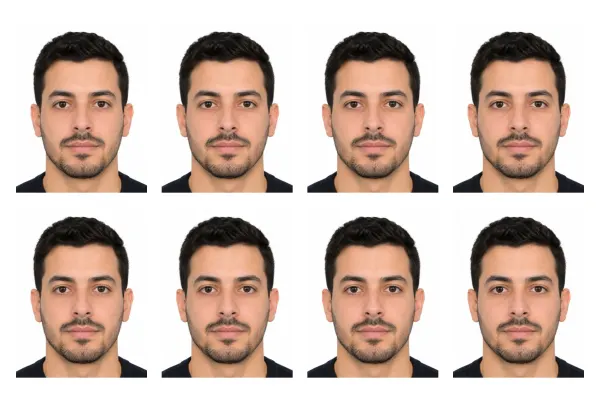
A photo print sheet maker arranges one or more photos on printable paper at exact physical sizes, often with cut guides, then exports a PDF for home printing. PhotoSheet Pro focuses on photo sheets and passport multi-ups — not generic collages.
Free to try · No account required · Photos stay on your device
Quick facts
- Millimetres
- Paper + photo sizes in real mm
- Centimetres
- A4, 10×15, custom cm
- Inches
- Letter, 4×6, 5×7, custom in
- Aspect ratio
- Per photo slot
How many fit on a sheet
- A4 multi-photoDepends on size
- 4×6 passport multi-up4–8 typical
Important when printing
Select Actual Size / 100% in your printer dialog. Do not select “Fit to Page” or “Scale to Fit” — that changes the physical size.
Print settings checklist
- Export a PDF from PhotoSheet Pro at the paper size you will load.
- In the print dialog choose Actual Size or 100% scale.
- Turn off Fit to Page, Scale to Fit, and “shrink to printable area”.
- Select the matching paper size in the printer tray settings.
- If using borderless, expect slight overscan crop — add a small margin if edges matter.
What is a photo print sheet?
A page prepared so photos print at the size you want, ready to cut and keep — including passport sheets on 4×6 paper and multi-photo A4 layouts.
Workflow
Choose paper → set photo size → arrange or fill sheet → add cut guides → export PDF → print at 100% / Actual Size.
Privacy
Photos are processed locally in your browser. Nothing is uploaded unless you choose to save a project to your signed-in account.
Print Accuracy
Millimetre-based layouts, 300 DPI PDF, optional cut lines, and an explicit 100% printing workflow — so sheets match the size you expect.
Frequently asked questions
- Does it include cutting guides?
- Yes — optional cut lines in the editor.
- Can I fill a sheet with the same photo?
- Yes — fill-sheet duplicates one image across the page (great for passport prints).
- Do I need an account?
- No account needed to try the editor or download 1 free PDF. Sign in for 2 clean HD exports, 1 preview/week, and cloud save. Pro unlocks unlimited exports.
Related
Free to try · No account required · Photos stay on your device